|
QuickBuild2 Documentation
|
Supported operating systems
- Windows 2000/XP/Vista/7, 32 bit and 64 bit, x86 and IA architecture
- Linux, 32 bit and 64 bit, x86 and PowerPC architecture
- Mac OS X, 32 bit and 64 bit
- Solaris, 32 bit and 64 bit, Sparc and x86 architecture
- AIX, 32 bit and 64 bit, PowerPC architecture
- HP-UX, 32 bit and 64 bit, IA and PARISC architecture
- FreeBSD, 32 bit and 64 bit, x86 architecture
Memory requirement
- 64M minimum, 256M recommended
Installation Steps
- Make sure QuickBuild server is up and running, login to QuickBuild as administrator and navigate to Grid tab, click the the link download build agent to download build agent of desired platform. Extract downloaded file into the directory where the build agent should be installed.
- Make sure you have JDK5 or JDK6 installed. For Sun JDK5, QuickBuild requires at least update 11. Download the appropriate JDK version from http://java.sun.com
 if needed. if needed.
- Make sure the java command exists in the system path; if not, you will need to modify the file conf/wrapper.conf under the build agent's installation directory, and point the entry wrapper.java.command to path of the java command.
- For Windows platform, run bin/agent.bat to start the agent; for Unix platforms, run command bin/agent.sh console to start the agent. Please note:
- Make sure the user running the command has full access rights to the agent's installation directory.
- This command runs QuickBuild agent in console mode. Follow this guide on how to install the agent as system service so that it auto-starts when machine reboots.
- By default, the build agent will run on port 8811. If this port is used by other process, you can change the port number to an unused port by running the command config.bat (for Windows) or config.sh (for Unix).
- After the agent starts up, it may complain with the message "This build agent is not authorized to join the grid". Upon this, you need to login to QuickBuild server and authorize the agent to join the grid. Refer to Working with Build Grid for how to authorize build agents to join grid.
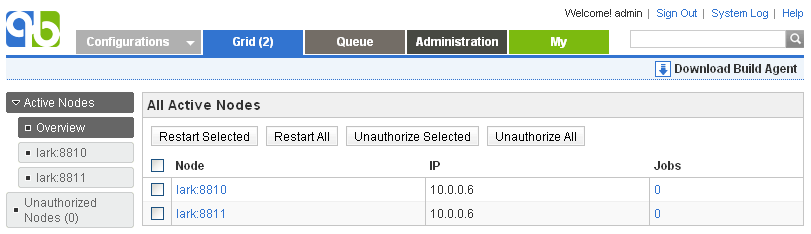
- If the build agent is connected to QuickBuild server correctly, you will see its entry in active node list of the build grid like below by logging in as administrator:
|