|
QuickBuild2 Documentation
|
To publish JUnit
Generate JUnit ReportQuickBuild will NOT generate JUnit JUnit target in build.xml <target name="junit" depends="compile.test"> <mkdir dir="${junit.report.dir}" /> <mkdir dir="${junit.report.dir}/test-out" /> <record name="${junit.report.dir}/test-output.txt" append="no" action="start"/> <junit printsummary="yes" haltonfailure="false" fork="yes"> <classpath refid="test.classpath"/> <formatter type="xml"/> <batchtest fork="yes" todir="${junit.report.dir}/test-out"> <fileset dir="${test.home}"> <include name="**/*Test.java"/> <exclude name="**/*AbstractTest.java"/> </fileset> </batchtest> </junit> <junitreport todir="${junit.report.dir}"> <fileset dir="${junit.report.dir}/test-out"> <include name="TEST-*.xml"/> </fileset> </junitreport> <record name="${junit.report.dir}/test-output.txt" action="stop"/> </target> The code snippet will generate the XML reports for each test case, and the reports will be captured to '${junit.report.dir}' directory.
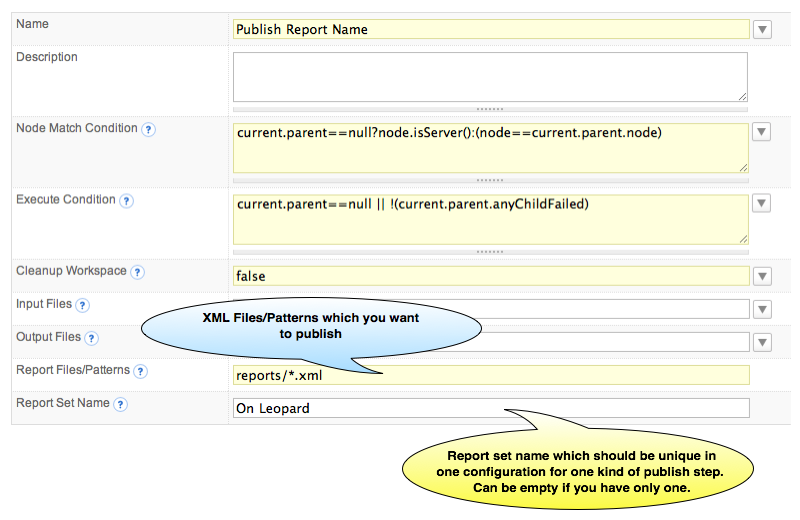
Publish JUnit ReportJust like all other build reports, you add JUnit report by [adding a publish step] in a configuration. When you add publish JUnit Report step, the following screen will be displayed:
In Report Files/Patterns field, QuickBuild uses Ant style file patterns to collect the reports, and the directory you specified is relative to the workspace directory.
If you have several report sets, you can add several publish JUnit steps with different report set names. |